Why Is Spotify Quieter Than Other Apps? How to Make Spotify Louder on PC and Mobile
If you have ever switched from YouTube or Apple Music to Spotify and noticed the volume suddenly drop, you are not imagining it. Many users find that Spotify is quieter than other apps, even when the system volume is maxed out. The good news is that this is almost always a settings issue — not a hardware problem — and there are several proven ways to make Spotify louder on both PC and mobile.
This guide covers exactly why Spotify sounds quiet, how to fix a quiet Spotify on PC, and the most effective methods to make Spotify louder on PC and mobile devices.
Why Is Spotify Quieter Than Other Apps?
Spotify uses a feature called audio normalization that keeps all tracks at a consistent volume level — even if the original recording was mastered louder. This protects your ears from sudden volume jumps between songs but also caps how loud Spotify can get compared to apps without this feature.
On top of that, Spotify’s default Volume Level setting is set to Normal, not Loud — leaving extra volume on the table that most users never discover. Additionally, lower audio quality settings can make music feel thinner and quieter, especially on PC where system audio settings add another layer of complexity.
How to Make Spotify Louder: Quick Fixes First
Check the In-App Volume Slider
Open Spotify and play any song. On desktop, the volume slider sits in the bottom right corner. On mobile, tap the volume icon or use your phone’s physical buttons. Make sure this slider is pushed all the way up before trying anything else.
Check Your Device Volume
Your phone or computer’s system volume can silently cap Spotify’s output even with the in-app slider maxed. On PC, check the system volume mixer specifically — sometimes Spotify gets lowered independently of other apps. On mobile, check your media volume separately from ringtone volume.
How to Change Spotify Volume Level to Loud
This single setting makes the biggest difference for most users trying to make Spotify louder.
On iPhone and Android
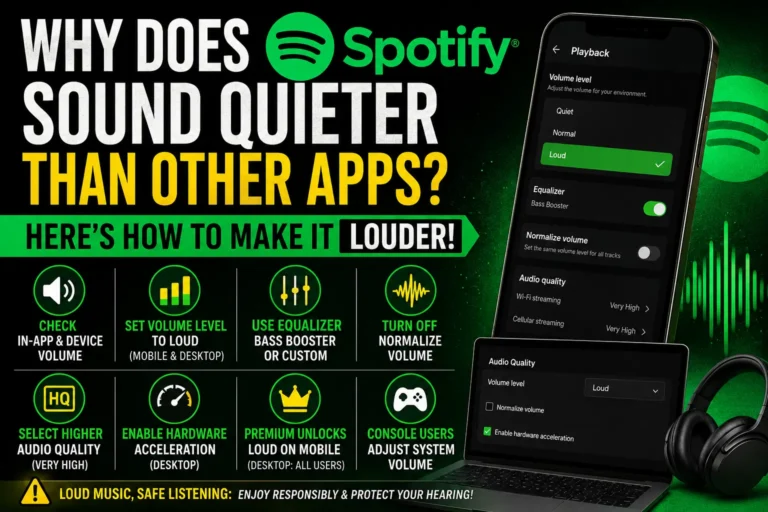
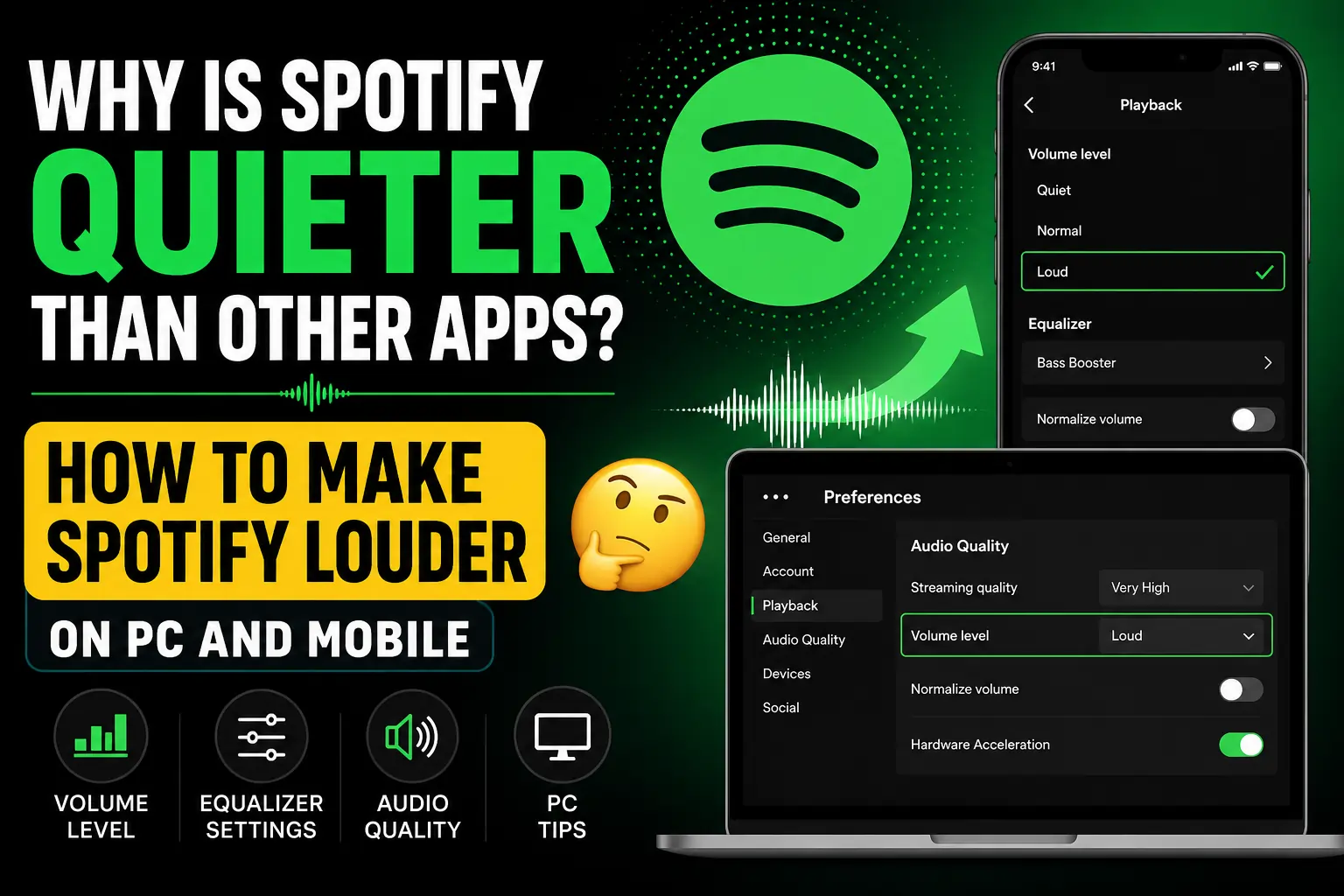
Tap the settings gear icon, top right. Tap Playback. Under Volume Level, select Loud. Note — on mobile this feature requires a Spotify Premium subscription.
On Windows
Click the three dots, top left. Hover over Edit, then click Preferences. Under Audio Quality, find Volume Level and select Loud from the dropdown. No Premium required on desktop.
On Mac
Click Spotify in the menu bar, then Preferences. In the Audio Quality section, click the Volume Level dropdown and choose Loud. Like Windows, this works without Premium.
How to Use the Spotify Equalizer for Louder Sound
Best Equalizer Presets for Louder Music
Go to Settings → Playback → Equalizer on mobile. Choose the Bass Booster or Loud preset — these boost specific frequencies that make music feel noticeably louder without raising the actual volume level. Note — the equalizer is only available on the mobile app, not desktop.
Manual Equalizer Adjustment
For finer control, select Custom in the equalizer menu and manually slide individual frequency bands upward. Boosting the bass and mid-range frequencies typically creates the biggest perceived volume increase.
Turn Off Audio Normalization
Normalization keeps all songs at a similar volume — which can make individually loud tracks sound capped. Go to Settings → Playback and toggle off Normalize Volume. This lets naturally louder-mastered tracks play at their full original volume instead of being held back.
Select Higher Audio Quality Setting
Lower audio quality settings compress the sound, which can make music feel thinner and quieter. Go to Settings → Audio Quality and set both Wi-Fi and Cellular streaming quality to Very High. Higher quality audio carries more dynamic range, which often translates to a fuller, louder-feeling sound.
How to Make Spotify Louder on PC Specifically
If you are dealing with a quiet Spotify on PC, there are additional steps beyond the mobile fixes:
Activate Hardware Acceleration
On Windows and Mac desktop apps, go to Settings → Show Advanced Settings → scroll to Hardware Acceleration and toggle it on. This uses your computer’s dedicated audio hardware instead of software processing alone — occasionally resolving quiet or distorted playback issues that volume settings alone cannot fix.
Check Windows Audio Enhancements
- Right-click the speaker icon in the system tray and select Sounds.
- Go to the Playback tab, select your output device, and click Properties.
- Under the Enhancements tab, check Loudness Equalization — this boosts quieter sounds to match louder ones.
- Click Apply and test Spotify again.
Update Audio Drivers
Outdated or generic audio drivers can limit output volume. Visit your PC manufacturer’s website or use Windows Update to check for the latest audio drivers.
Disable Exclusive Mode
In the same Properties window under the Advanced tab, uncheck Allow applications to take exclusive control of this device. Sometimes other apps grab audio priority and reduce Spotify’s volume.
Does Spotify Premium Make a Difference?
Yes, in one specific way. The Loud volume level option on mobile devices is locked behind a Premium subscription. Free users on mobile cannot access this setting. However, Windows and Mac desktop apps offer the Loud setting to all users regardless of subscription tier.
Frequently Asked Questions
Why is my Spotify so quiet even at max volume?
Audio normalization and a default Volume Level setting of Normal are the most common reasons. Switch Volume Level to Loud in Settings → Playback and turn off Normalize Volume for a noticeable boost.
How do I make Spotify louder on PC without Premium?
Use the Loud volume setting (free on desktop), turn off normalization, enable Loudness Equalization in Windows sound settings, and activate hardware acceleration in Spotify’s advanced settings.
Does Spotify sound better on PC than mobile?
Potentially yes, because the Loud setting and hardware acceleration are available to all users on desktop, while mobile users need Premium for the Loud setting.
Will increasing volume reduce audio quality?
Using the Loud setting does not degrade audio quality — it adjusts output gain, not compression. However, pushing the equalizer to extreme levels can introduce minor distortion at very high volumes.
Why is Spotify quieter on web player than the app?
The web player lacks the Loud volume level setting and does not support hardware acceleration. Both features are exclusive to the dedicated desktop and mobile applications.
Final Thoughts
If Spotify sounds quieter than your other apps, the fix is almost never your hardware — it is a combination of hidden settings that are easy to adjust once you know where to look. Switching the Volume Level to Loud, turning off normalization, enabling Loudness Equalization on Windows, and selecting Very High streaming quality are the four changes that consistently produce the biggest improvement.
Start with the Volume Level setting — it is the single most impactful change — then work through the remaining tips until your music sounds as loud and clear as it should.