Why Does Spotify Sound Quieter Than Other Apps?
Spotify employs a feature called audio normalization that maintains all tracks at a consistent volume level even if the original recording was mastered louder. This safeguards your ears from abrupt volume surges between songs but also limits how loud Spotify can become compared to apps without this feature.
Additionally, Spotify’s default Volume Level setting is configured to Normal, not Loud — leaving extra volume potential that most users never discover.How to Make Spotify Sound Louder – Quick Fixes First
Check the In-App Volume Slider
Open Spotify and play any song. On desktop, the volume slider is positioned in the bottom right corner. On mobile, tap the volume icon or utilize your phone’s physical buttons. Ensure this slider is pushed completely up before attempting anything else.
Check Your Device Volume
Your phone or computer’s system volume can silently restrict Spotify’s output even with the in-app slider at maximum. Verify your phone’s media volume separately from ringtone volume, and confirm your computer’s system volume mixer is not limiting Spotify specifically.
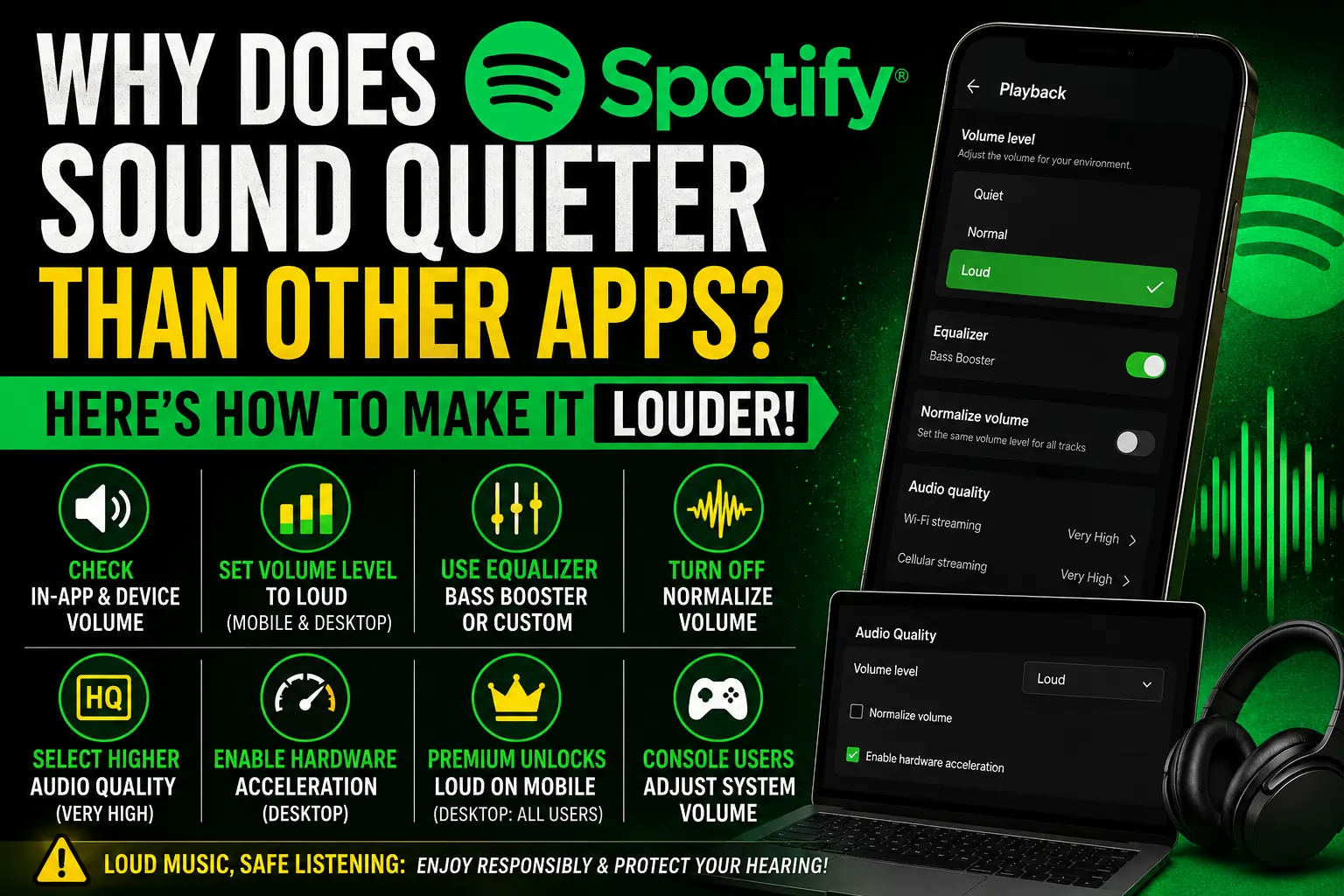
How to Change Spotify Volume Level to Loud
This single adjustment makes the most significant difference for the majority of users.
On iPhone and Android
Tap the settings gear icon, top right. Tap Playback. Under Volume Level, select Loud. Note — on mobile this feature requires a Spotify Premium subscription.
On Windows
Click the three dots, top left. Hover over Edit, then click Preferences. Under Audio Quality, locate Volume Level and select Loud from the dropdown. No Premium required on desktop.
On Mac
Click Spotify in the menu bar, then Preferences. In the Audio Quality section, click the Volume Level dropdown and choose Loud. Like Windows, this works without Premium.
How to Use the Spotify Equalizer for Louder Sound
Best Equalizer Presets for Louder Music
Navigate to Settings → Playback → Equalizer on mobile. Select the Bass Booster or Loud preset — these amplify specific frequencies that make music feel noticeably louder without increasing the actual volume level.
Manual Equalizer Adjustment
For more precise control, choose Custom in the equalizer menu and manually slide individual frequency bands upward. Boosting the bass and mid-range frequencies typically produces the greatest perceived volume increase. Note — the equalizer is exclusively available on the mobile app, not desktop.
Turn Off Audio Normalization
Normalization keeps all songs at a similar volume — which can cause individually loud tracks to sound capped. Go to Settings → Playback and toggle off Normalize Volume. This permits naturally louder-mastered tracks to play at their full original volume rather than being restrained.
Select Higher Audio Quality Setting
Lower audio quality settings compress the sound, which can make music feel thinner and quieter. Navigate to Settings → Audio Quality and set both Wi-Fi and Cellular streaming quality to Very High. Higher quality audio carries greater dynamic range, which frequently translates to a fuller, louder-feeling sound.
Activate Hardware Acceleration (Desktop)
On Windows and Mac desktop apps, go to Settings → Show Advanced Settings → scroll to Hardware Acceleration and toggle it on. This utilizes your computer’s dedicated audio hardware instead of software processing alone — occasionally resolving quiet or distorted playback issues that volume settings alone cannot remedy.
Does Spotify Premium Make a Difference?
Yes, in one specific aspect. The Loud volume level option on mobile devices is locked behind a Premium subscription. Free users on mobile cannot access this setting. However, Windows and Mac desktop apps offer the Loud setting to all users irrespective of subscription tier.
How to Make Spotify Louder on Gaming Consoles
PS4 and PS5
You cannot open the Spotify app directly to adjust its volume on PlayStation consoles. Instead, navigate to your console’s Sound Settings and adjust the overall system volume, since Spotify streams through the console’s default audio output without its own in-app controls here.
Xbox
Similarly on Xbox, Spotify volume is controlled through the console’s general audio settings rather than within the Spotify app itself. Adjust your Xbox system volume and connected speaker or headset volume for the optimal result.
Spotify Web Player Volume Limitations
If you utilize Spotify through a browser instead of the desktop or mobile app, you will not have access to the Loud volume level setting at all. The web player only offers the standard browser volume control. For a genuinely louder experience, download the dedicated desktop or mobile app instead.
Is It Safe to Make Spotify Louder? Hearing Health Warning
Pushing volume higher feels satisfying in the moment but carries genuine risk with prolonged exposure, particularly through headphones or earbuds. Sustained loud listening can cause permanent hearing damage over time. Use the Loud setting and equalizer boosts thoughtfully — not as your default for every listening session.
Frequently Asked Questions
Why is my Spotify so quiet even at max volume?
Audio normalization and a default Volume Level setting of Normal are the most common causes. Switch Volume Level to Loud in Settings → Playback and turn off Normalize Volume for a noticeable boost.
Does Spotify Premium make the app louder?
Yes, Premium unlocks the Loud volume level option on mobile devices. Free users on mobile cannot access this setting. Desktop apps offer Loud to all users regardless of subscription.
Will increasing volume reduce audio quality?
Using the Loud setting does not degrade audio quality — it adjusts output gain, not compression. However, pushing the equalizer to extreme levels can introduce minor distortion at very high volumes.
Why is Spotify quieter on web player than the app?
The web player lacks the Loud volume level setting and does not support hardware acceleration. Both features are exclusive to the dedicated desktop and mobile applications.
How do I fix Spotify volume on PS5?
Open your PS5 Sound Settings and increase the system volume. Spotify does not have its own in-app volume control on PlayStation consoles, so all adjustments must happen through the console’s audio settings.